

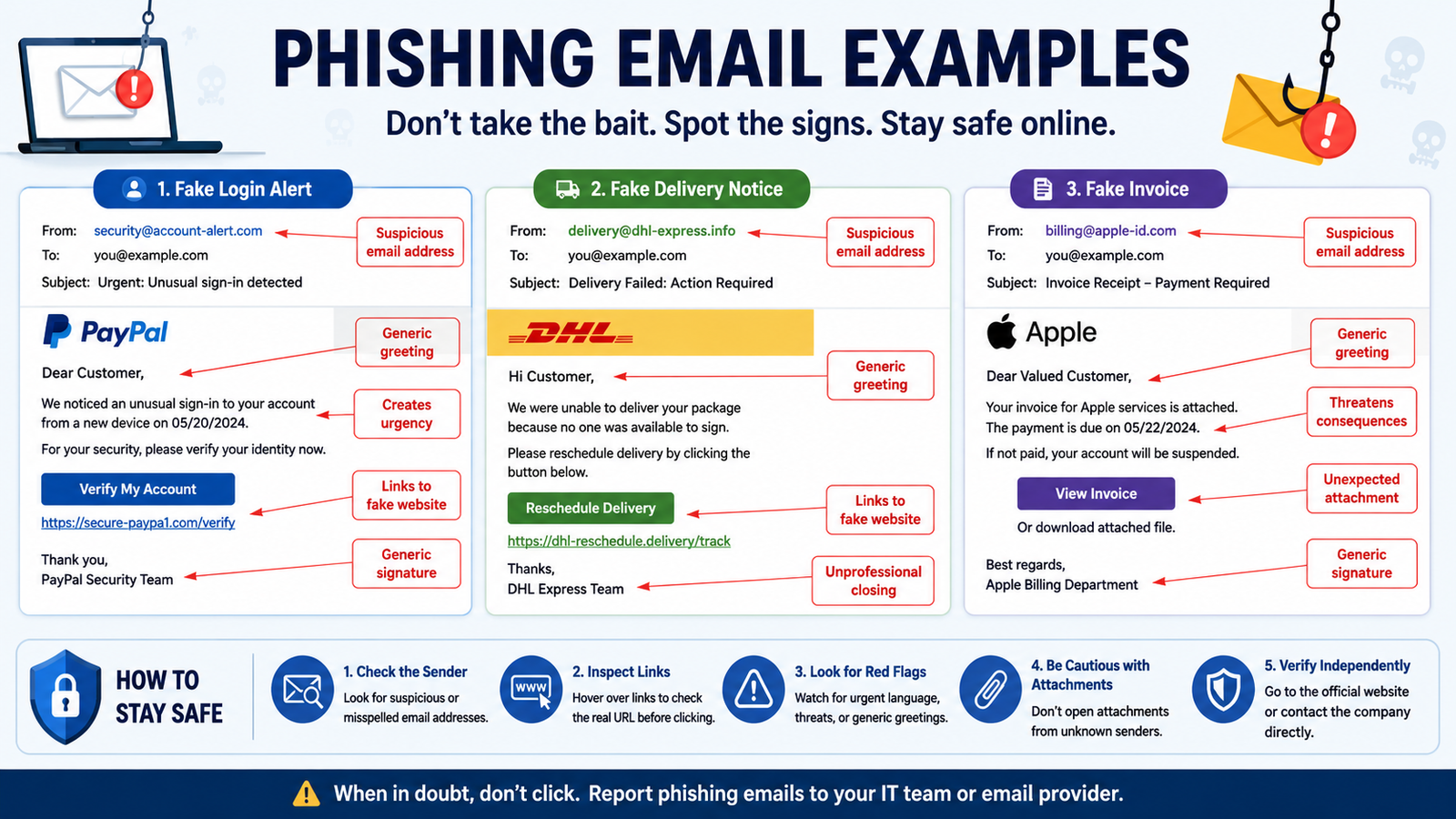
Phishing emails are one of the most common cybersecurity threats affecting individuals and businesses worldwide. Attackers use carefully designed messages to trick people into clicking malicious links, downloading infected files, or sharing sensitive information such as passwords and banking details.
Looking at real phishing email examples makes it easier to understand how these scams work and what warning signs to watch for. Whether you are a student, employee, business owner, or everyday internet user, recognizing suspicious emails can help prevent account theft, financial loss, and data breaches.
This guide covers realistic phishing email examples, common attack patterns, red flags, and practical prevention tips. It also includes examples that can be used for security awareness training and employee education.
What Is a Phishing Email?
A phishing email is a fraudulent message designed to look like it comes from a trusted source, such as a bank, company, online service, or colleague. The goal is usually to steal information, spread malware, or convince victims to make unauthorized payments.
Cybercriminals use social engineering techniques instead of relying only on technical attacks. They manipulate emotions such as fear, urgency, curiosity, and trust to make people act quickly without checking the message carefully.
Common goals of phishing emails include:
Stealing login credentials
Collecting financial information
Installing malware
Accessing company systems
Conducting identity theft
Performing business fraud
Phishing attacks can target anyone, including students, employees, and senior internet users.
How Phishing Emails Trick Victims
Most phishing campaigns follow a similar process:
The attacker creates a fake email that looks legitimate.
The message creates urgency or offers something attractive.
The victim clicks a link, opens an attachment, or provides information.
The attacker collects stolen data or gains access to accounts.
Modern phishing emails are becoming more convincing because attackers use real company branding, AI-generated messages, and personalized information collected from online sources.
Common Phishing Email Examples You Should Know
Understanding different attack styles is one of the best ways to identify suspicious messages.
Bank Account Verification Phishing Email Example
Bank-related phishing emails are among the most common scams. Attackers often pretend to be financial institutions and claim that users must verify their accounts.
Example:
Subject: Your account access has been temporarily limited
Email message:
“Dear customer, we noticed unusual activity on your account. To protect your account, please confirm your information by clicking the secure verification link below.”
Why this is suspicious:
Creates fear about account problems
Uses urgent language
Requests personal information
Includes a suspicious login link
Real banks usually do not ask customers to confirm passwords or sensitive details through email links.
Microsoft 365 Password Reset Phishing Email Example
Businesses frequently experience phishing attacks targeting Microsoft 365 accounts because employees use these accounts for emails, documents, and company systems.
Example:
Subject: Your Microsoft account password expires today
Email message:
“Your organization requires immediate password verification. Click below to prevent account suspension.”
Warning signs:
Fake Microsoft login pages
Unusual sender domains
Pressure to act quickly
Requests for login credentials
These phishing email examples for employees are commonly used in security awareness training because workplace accounts are valuable targets.
PayPal and Payment Phishing Email Example
Online payment platforms are popular targets because attackers know users are concerned about financial transactions.
Example:
Subject: Payment confirmation required
Email message:
“Your recent payment could not be completed. Please update your billing information immediately.”
Red flags include:
Unexpected payment notifications
Requests for card details
Fake refund claims
Suspicious website links
Users should always open payment platforms directly through official websites instead of clicking email links.
Amazon Delivery Phishing Email Example
Delivery scams increased as online shopping became more popular. Attackers often send fake shipping updates to collect personal information.
Example:
Subject: Your package delivery failed
Email message:
“We were unable to deliver your package. Confirm your address to reschedule delivery.”
Warning signs:
Unknown tracking numbers
Requests for payment
Fake delivery websites
Urgent deadlines
These examples are useful for phishing email examples for students because younger users often receive online shopping-related scams.
Invoice and Business Payment Phishing Email Example
Companies are common targets because attackers can steal large amounts of money through fake invoices.
Example:
Subject: Updated invoice payment details
Email message:
“Please update your records and send future payments to the new bank account listed below.”
Common risks:
Fake vendor emails
CEO impersonation
Payment redirection scams
Fake invoices
Businesses should verify payment changes through another communication channel.
HR and Employee Phishing Email Example
Attackers often impersonate HR departments to target employees.
Example:
Subject: New employee benefits document available
The email asks users to:
Download a file
Sign into a fake company portal
Provide employee information
These phishing email examples for training help organizations teach employees how attackers use workplace scenarios.
Social Media Account Phishing Email Example
Social media phishing emails often claim that an account has violated rules or needs verification.
Example:
Subject: Your account will be removed
The attacker attempts to:
Steal passwords
Take over accounts
Access personal information
Always verify account warnings by visiting the official platform directly.
Phishing Email Examples Compared
Signs That an Email Is a Phishing Attempt
Knowing the warning signs can help users avoid becoming victims.
Suspicious Sender Address
Attackers often create email addresses that look similar to legitimate companies.
Example:
Legitimate:
company.com
Suspicious:
company-support-security.com
Always check the sender address carefully.
Urgent or Threatening Language
Many phishing emails try to create panic.
Common phrases include:
“Your account will close today”
“Immediate action required”
“Final warning”
“Verify within 24 hours”
Urgency is often used to stop people from thinking carefully.
Suspicious Links and Attachments
Never open unexpected attachments or click unknown links.
Before clicking:
Hover over links
Check website addresses
Confirm the sender
Scan attachments
Requests for Passwords or Sensitive Information
Legitimate companies rarely request:
Passwords
Security codes
Banking details
Personal identification information through email
Any email requesting sensitive information should be treated carefully.
Modern Phishing Techniques Attackers Use Today
Phishing continues to evolve as attackers adopt new strategies.
QR Code Phishing (Quishing)
Attackers place malicious QR codes inside emails. When users scan them, they are redirected to fake login pages.
This technique is becoming popular because users often trust QR codes.
AI-Generated Phishing Emails
Artificial intelligence allows attackers to create professional-looking messages with better grammar and personalization.
AI phishing emails can appear more realistic because they:
Copy company communication styles
Include personal details
Avoid obvious spelling mistakes
Spear Phishing Attacks
Spear phishing targets specific individuals instead of sending random emails.
Examples:
Fake messages from managers
Customized employee requests
Personalized business scams
Business Email Compromise (BEC)
BEC attacks involve criminals pretending to be executives or trusted partners.
A fake CEO email may request:
Urgent payment
Confidential documents
Employee information
Phishing Email Examples for Training and Education
Organizations often use simulated phishing emails to train employees and improve security awareness.
Useful training examples include:
Fake password reset emails
Suspicious invoice messages
Fake HR notifications
Delivery scams
Account verification emails
Phishing email examples pdf files and phishing email sample download resources are commonly used by cybersecurity teams to create awareness programs.
However, training examples should always be reviewed carefully before being shared with users.
What To Do If You Receive a Phishing Email
If you receive a suspicious email:
Do not click links.
Do not download attachments.
Verify the sender independently.
Report the message as phishing.
Delete the email.
If you clicked a phishing link:
Change affected passwords immediately
Enable multi-factor authentication
Scan your device
Contact your organization or financial provider if necessary
How Businesses Can Prevent Phishing Attacks
Organizations can reduce phishing risks through:
Employee Awareness Training
Regular training helps employees recognize suspicious messages.
Multi-Factor Authentication
MFA adds an extra security layer even if passwords are stolen.
Email Security Solutions
Businesses should use:
Spam filtering
Email authentication
Malware scanning
Security monitoring tools
Clear Reporting Policies
Employees should know exactly how to report suspicious emails quickly.
Conclusion
Phishing emails remain one of the biggest cybersecurity challenges because they exploit human trust rather than only technical weaknesses. Learning from real phishing email examples helps users recognize suspicious messages before they cause harm.
Whether you are protecting personal accounts, training employees, or improving cybersecurity awareness, understanding common phishing patterns is an essential step toward staying safe online. Always verify unexpected messages, avoid suspicious links, and treat urgent requests with caution.
Frequently Asked Questions About Phishing Email Examples
What is the most common phishing email example?
The most common phishing emails include fake password resets, bank verification requests, delivery notifications, and payment alerts.
Where can I find phishing email examples for students?
Students can use cybersecurity awareness resources that include safe phishing simulations, fake email samples, and educational examples.
Are free phishing email examples safe to use?
Free phishing email examples can be useful for training, but they should come from trusted cybersecurity sources and should never contain active malicious links.
What are phishing email examples used for in training?
Phishing email examples for training help employees and users learn how to identify scams before they accidentally click harmful links.
Can I download phishing email sample files?
Yes, organizations often create phishing email sample download materials for security training. Always verify that files come from trusted sources.
Are phishing email examples on Reddit reliable?
Phishing email examples Reddit discussions can provide real user experiences, but examples should be verified because community posts may not always be accurate.
Leave a Reply